
How to Make a Line Follower Robot Using Arduino - Connection & Code
Introduction
A Line Following Robot is one of the most exciting and rewarding beginner robotics projects you can build. It teaches you the fundamentals of sensor input, motor control, and real-time decision making — all core skills in robotics and embedded systems.
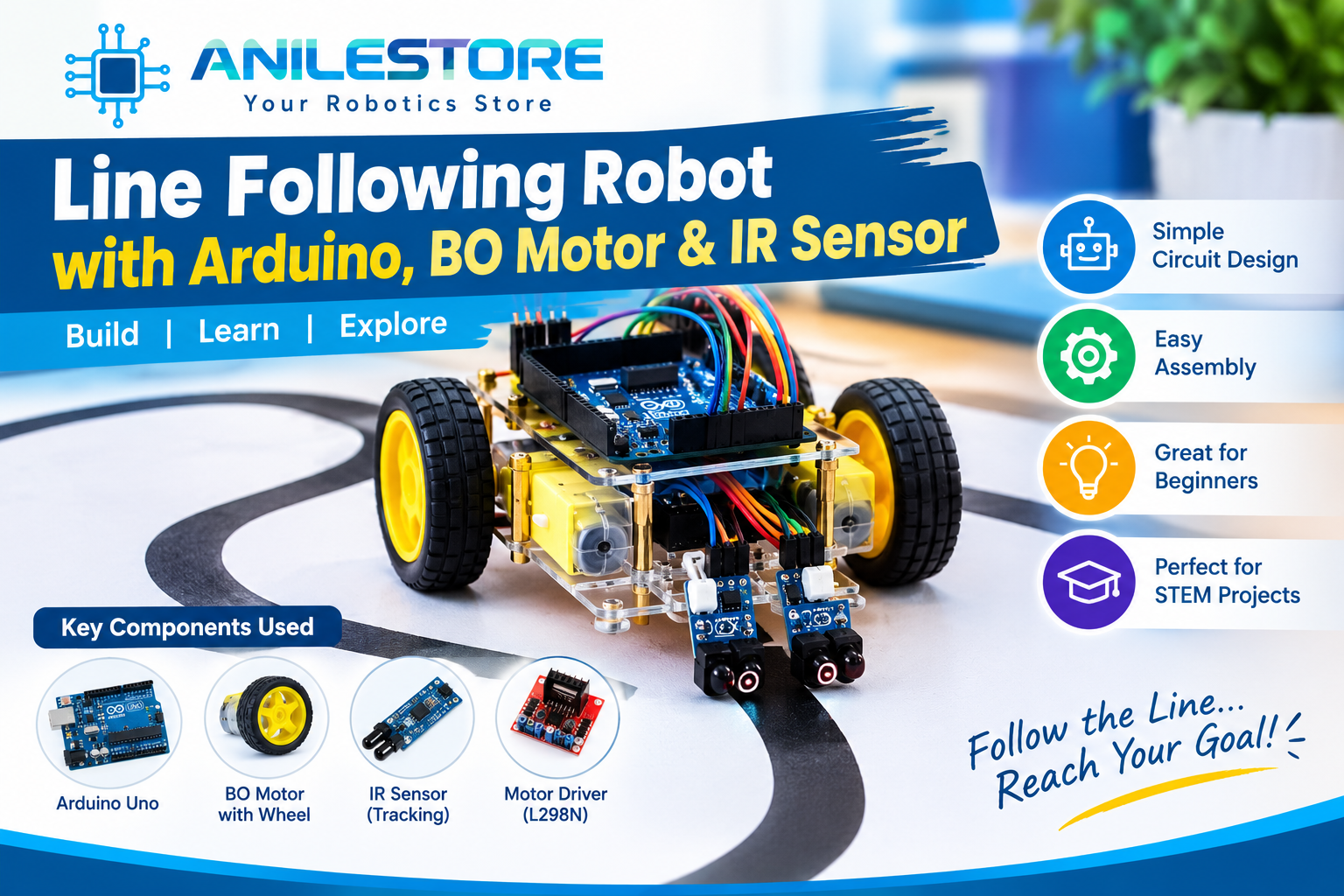
In this guide, we'll build a two-wheeled line follower that detects a black line on a white surface and follows it automatically. The robot uses IR sensors to detect the line, an Arduino Uno as the brain, and an L298N motor driver to power the BO gear motors. All components are available in stock at Anil Electronic Store with same-day dispatch.
What You'll Build
- A 2-wheeled autonomous robot that follows a black line on white surface
- Uses 2 IR sensors for left and right line detection
- Responds in real time — turns left, right, or goes straight automatically
- Powered by a 9V battery or 2×18650 Li-ion cells
- Total build time: ~1.5 to 2 hours
How It Works
Each IR sensor module has an IR LED and a photodiode. When the sensor is over a white surface, the IR light reflects back strongly — the sensor outputs HIGH (1). When over a black line, the IR light is absorbed and barely reflects — the sensor outputs LOW (0).
The Arduino reads both sensors and decides:
- Both sensors on white → Go straight
- Left sensor on black → Turn left
- Right sensor on black → Turn right
- Both sensors on black → Stop (end of line or junction)
Components Required (BOM)
All components below are in stock at anilestore.com. See the kit panel on this page to add everything in one click.
Circuit Connections
IR Sensor Modules → Arduino Uno:
- Left Sensor VCC → 5V
- Left Sensor GND → GND
- Left Sensor OUT → Digital Pin D2
- Right Sensor VCC → 5V
- Right Sensor GND → GND
- Right Sensor OUT → Digital Pin D3
L298N Motor Driver → Arduino Uno:
- IN1 → D4
- IN2 → D5
- IN3 → D6
- IN4 → D7
- ENA → D9 (PWM – left motor speed)
- ENB → D10 (PWM – right motor speed)
- 5V pin → Arduino 5V (if jumper is removed)
- GND → Arduino GND
L298N Motor Driver → BO Motors:
- OUT1 & OUT2 → Left BO Motor terminals
- OUT3 & OUT4 → Right BO Motor terminals
Power:
- Connect 9V battery or 7.4V Li-ion pack to L298N's 12V power input and GND
- The L298N's onboard 5V regulator can power the Arduino via its 5V pin (keep jumper on if battery is 7–12V)
Arduino Code
// Line Following Robot – Anil Electronic Store
// 2 IR Sensors + L298N + 2 BO Motors

// Motor Driver Pins
const int IN1 = 4;
const int IN2 = 5;
const int IN3 = 6;
const int IN4 = 7;
const int ENA = 9;   // Left motor speed (PWM)
const int ENB = 10;  // Right motor speed (PWM)

// IR Sensor Pins
const int leftSensor  = 2;
const int rightSensor = 3;

// Speed (0–255)
int motorSpeed = 180;

void setup() {
  pinMode(IN1, OUTPUT);
  pinMode(IN2, OUTPUT);
  pinMode(IN3, OUTPUT);
  pinMode(IN4, OUTPUT);
  pinMode(ENA, OUTPUT);
  pinMode(ENB, OUTPUT);
  pinMode(leftSensor,  INPUT);
  pinMode(rightSensor, INPUT);
  Serial.begin(9600);
}

void moveForward() {
  analogWrite(ENA, motorSpeed);
  analogWrite(ENB, motorSpeed);
  digitalWrite(IN1, HIGH); digitalWrite(IN2, LOW);
  digitalWrite(IN3, HIGH); digitalWrite(IN4, LOW);
}

void turnLeft() {
  analogWrite(ENA, 120);
  analogWrite(ENB, motorSpeed);
  digitalWrite(IN1, LOW);  digitalWrite(IN2, HIGH);
  digitalWrite(IN3, HIGH); digitalWrite(IN4, LOW);
}

void turnRight() {
  analogWrite(ENA, motorSpeed);
  analogWrite(ENB, 120);
  digitalWrite(IN1, HIGH); digitalWrite(IN2, LOW);
  digitalWrite(IN3, LOW);  digitalWrite(IN4, HIGH);
}

void stopMotors() {
  digitalWrite(IN1, LOW); digitalWrite(IN2, LOW);
  digitalWrite(IN3, LOW); digitalWrite(IN4, LOW);
}

void loop() {
  int left  = digitalRead(leftSensor);
  int right = digitalRead(rightSensor);

  Serial.print("L:"); Serial.print(left);
  Serial.print(" R:"); Serial.println(right);

  if (left == 1 && right == 1) {
    // Both on white — go straight
    moveForward();
  }
  else if (left == 0 && right == 1) {
    // Left on black — turn left
    turnLeft();
  }
  else if (left == 1 && right == 0) {
    // Right on black — turn right
    turnRight();
  }
  else {
    // Both on black — stop
    stopMotors();
  }

  delay(10);
}
Step-by-Step Assembly
- Prepare the chassis: Mount both BO motors onto the 2WD robot chassis using the motor holder brackets. Attach the BO motor wheels to each motor shaft. Fit the caster wheel at the front-bottom of the chassis for balance.
- Mount the Arduino and L298N: Place the Arduino Uno on the upper deck of the chassis. Fix the L298N motor driver nearby. You can use double-sided tape or M3 screws if your chassis has mounting holes.
- Mount IR sensors: Attach the two IR obstacle/line sensors at the front-bottom of the chassis, pointing downward. Space them about 3–4 cm apart, centred on the chassis width. The sensors should sit approximately 5–10mm above the ground surface for best detection.
- Wire the motors: Connect the left BO motor wires to OUT1 and OUT2 on the L298N. Connect the right BO motor wires to OUT3 and OUT4. If the robot turns in the wrong direction during testing, simply swap the two wires of that motor.
- Wire the L298N to Arduino: Follow the pin connections listed in the circuit section above. Keep wire lengths short and tidy using jumper cables.
- Wire the IR sensors to Arduino: Connect left sensor OUT to D2 and right sensor OUT to D3. Power both sensors from Arduino's 5V and GND pins.
- Connect the battery: Connect your 9V battery snap or 7.4V Li-ion pack to the L298N's power input terminals. The L298N will power the Arduino via its 5V output pin — keep the jumper on the L298N for this.
- Upload the code: Connect the Arduino to your laptop via USB, upload the sketch, then disconnect USB. Place the robot on your line track and switch on the battery.
- Calibrate the IR sensors: Use the small blue potentiometer on each IR sensor module to adjust sensitivity. Hold the sensor over the black line — the indicator LED should turn OFF. Hold it over white — it should turn ON. Adjust until detection is reliable.
Making the Line Track
You don't need to buy anything special for the track! Simply use:
- Black electrical tape on a white A3/A4 sheet or white chart paper — works perfectly
- Make the track at least 2–3 cm wide for reliable detection
- Use gentle curves rather than sharp 90° turns for smoother robot navigation
- Keep the surface flat and well-lit for best IR sensor performance
Troubleshooting Tips
- Robot goes in circles or backwards: One motor is wired in reverse. Swap the two wires of that motor on the L298N output terminals.
- Robot doesn't follow the line smoothly: Adjust the IR sensor potentiometers for better sensitivity. Also try reducing
motorSpeedin the code from 180 to 150. - Sensors not detecting correctly: Check that sensors are pointing straight down and are 5–10mm above the surface. Avoid strong direct sunlight — it interferes with IR sensors.
- Robot stops immediately: Battery may be too weak. Use fresh batteries or a fully charged 18650 Li-ion pack.
- Motors not spinning: Check ENA and ENB jumpers on the L298N — they must be connected for basic speed control, or you must send a PWM signal to those pins.
Upgrades & Next Steps
- Add a 4-channel IR sensor module for smoother, more accurate line following on complex tracks
- Upgrade to PID control — proportional-integral-derivative algorithm for professional-grade smooth line following
- Add an HC-SR04 ultrasonic sensor at the front so the robot also avoids obstacles
- Replace the L298N with a TB6612FNG driver for more efficient motor control and less heat
- Add a Bluetooth module (HC-05) to switch between line-following and manual control modes from your phone
- Use a NodeMCU ESP8266 instead of Arduino Uno to add Wi-Fi control and telemetry logging
Why Buy Components from Anil Electronic Store?
- ✅ 100% genuine & tested components — every product verified before dispatch
- 🚚 Same-day dispatch for orders before 2 PM from our Ahmedabad warehouse
- 🧾 Official GST invoice included with every order
- 📲 WhatsApp engineer support — stuck on wiring or code? We help you directly
- 📦 Delivery across 19,000+ PIN codes all over India
Conclusion
The line following robot is a classic project that never gets old — it's used in school science fairs, college robotics competitions, and even as a foundation for warehouse automation robots. With the affordable components from Anil Electronic Store, you can build and test your first autonomous robot in a single afternoon.
Once you've mastered the basics, try upgrading to PID control or adding obstacle avoidance — the sky's the limit! Share your build with us on WhatsApp or tag us online. Happy building! 🤖
Build This Project Kit
Everything required to build this project. Uncheck any parts you already own, then click Buy Project Kit & Checkout to order everything in 1 click!
Anil Electronic Store Technical Team
Based in Odhav, Ahmedabad, we provide genuine electronic components, Arduino boards, robotics hardware, and industrial automation parts across India.