
Introduction
Waste segregation is one of the most critical steps in modern waste management — and yet most households and institutions still rely on manual sorting. What if a dustbin could automatically detect whether waste is wet or dry and direct it into the correct compartment on its own?
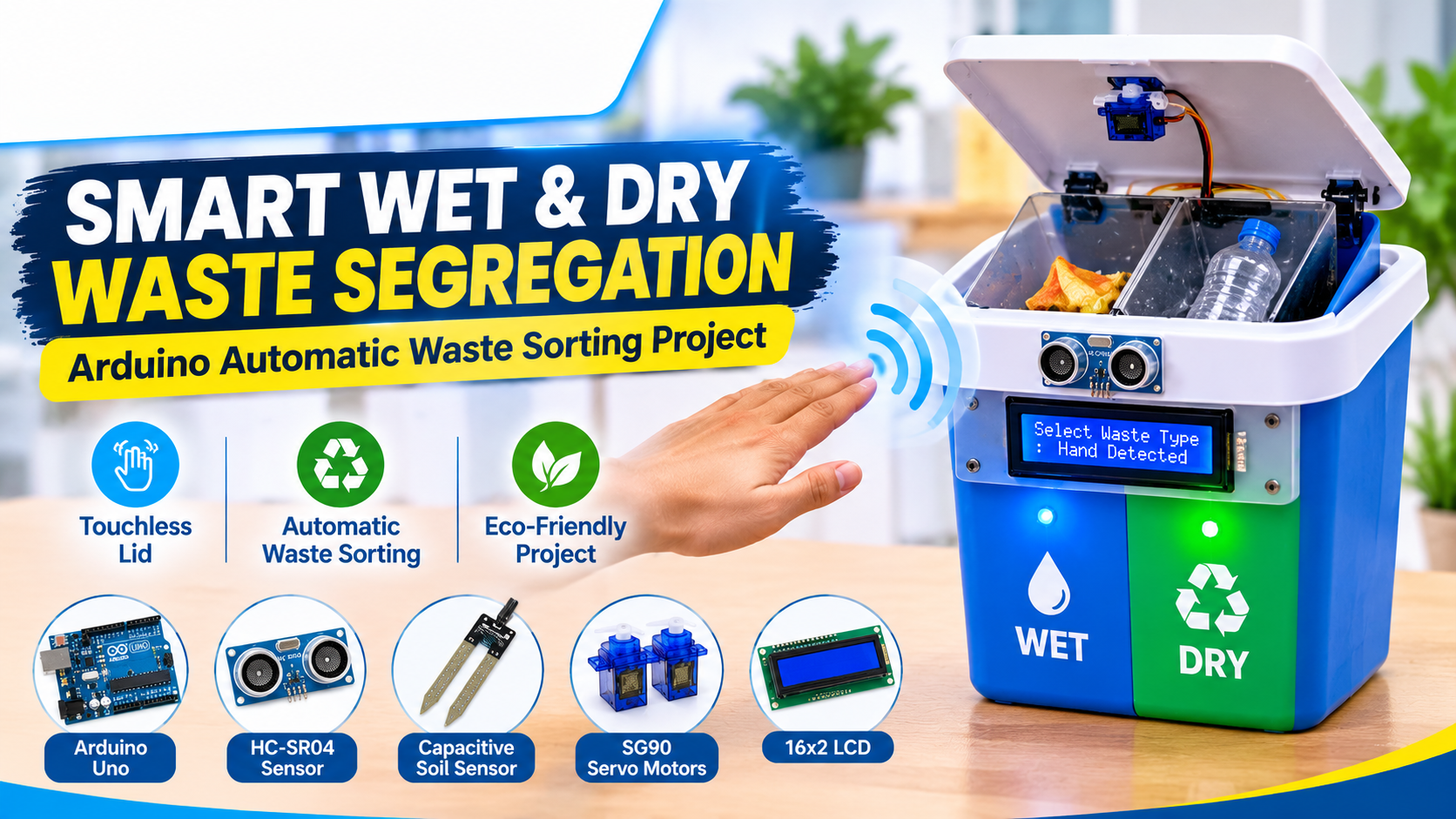
In this project, we'll build a Smart Wet & Dry Waste Segregating Dustbin using an Arduino Uno, a soil moisture sensor to detect wet waste, an HC-SR04 ultrasonic sensor for touchless lid opening, and two SG90 servo motors — one to open the main lid and one to rotate the internal sorting tray directing waste into the correct compartment.
This project is a significant upgrade over our earlier Smart Dustbin with Automatic Lid — it adds intelligent waste classification that makes it genuinely useful for homes, schools, offices, and smart city applications. All components are available at Anil Electronic Store, Ahmedabad.
What You'll Build
- A touchless dustbin that opens its lid automatically when your hand is detected nearby
- An internal moisture sensor that detects if the dropped waste is wet or dry
- A servo-controlled sorting tray that rotates to direct waste into the correct compartment
- Green LED for dry waste, Blue LED for wet waste — clear visual feedback
- A 16×2 LCD display showing waste type and bin fill status
- Buzzer alert when either compartment is full (detected by second ultrasonic sensor)
- Auto re-locks lid after 4 seconds
- Total build time: ~2.5 hours
How It Works
The system operates in a smart four-step cycle every time waste is deposited:
- Hand Detection: The HC-SR04 ultrasonic sensor mounted on the front of the dustbin continuously measures distance. When a hand or object comes within 15 cm, it triggers the lid servo to open the main lid — completely touchless.
- Waste Deposition: The user drops waste into the open bin. The internal sorting tray is in a neutral horizontal position at this stage, holding the waste temporarily above both compartments.
- Moisture Detection: A capacitive soil moisture sensor mounted on the sorting tray detects the moisture content of the deposited waste. If the sensor reads above a calibrated threshold — the waste is classified as Wet. If below the threshold — it is classified as Dry.
- Automatic Sorting: Based on the classification, the sorting servo motor rotates the tray left (wet compartment) or right (dry compartment), dropping the waste into the correct side. After 1.5 seconds, the tray returns to the neutral horizontal position, and the lid servo closes the main lid.
Why Waste Segregation Matters
India generates over 62 million tonnes of solid waste per year, and less than 20% is properly segregated at source. When wet and dry waste are mixed:
- Recyclable dry waste (paper, plastic, metal) gets contaminated and cannot be recycled
- Wet organic waste cannot be composted efficiently when mixed with non-biodegradables
- Landfill loads increase unnecessarily, accelerating environmental damage
A smart dustbin that segregates at source solves all three problems automatically — making this one of the most impactful Arduino projects you can build.
Components Required (BOM)
All components are in stock at anilestore.com with same-day dispatch before 2 PM. See the kit panel on this page to add everything in one click.
Circuit Connections
HC-SR04 Ultrasonic Sensor (Hand Detection) → Arduino Uno:
- VCC → 5V
- GND → GND
- TRIG → D9
- ECHO → D10
Capacitive Soil Moisture Sensor → Arduino Uno:
- VCC → 3.3V
- GND → GND
- AOUT → A0
Servo Motor 1 — Lid Opener → Arduino Uno:
- Red (VCC) → 5V
- Brown (GND) → GND
- Orange (Signal) → D5 (PWM)
Servo Motor 2 — Sorting Tray → Arduino Uno:
- Red (VCC) → 5V
- Brown (GND) → GND
- Orange (Signal) → D6 (PWM)
16×2 I2C LCD Display → Arduino Uno:
- VCC → 5V
- GND → GND
- SDA → A4
- SCL → A5
Green LED (Dry Waste Indicator) → Arduino Uno:
- Anode (+) → D3 via 220Ω resistor
- Cathode (–) → GND
Blue LED (Wet Waste Indicator) → Arduino Uno:
- Anode (+) → D4 via 220Ω resistor
- Cathode (–) → GND
Active Buzzer → Arduino Uno:
- Positive → D7
- Negative → GND
Power:
- Power the Arduino Uno via USB or 9V battery snap to barrel jack
- Both servo motors can be powered from Arduino's 5V pin when using USB power (500mA+)
- For battery-powered portable operation, use a 9V battery or 2×18650 Li-ion pack with TP4056 and 5V boost module
⚠️ Important: Two servo motors running simultaneously can draw up to 400–500mA. If the Arduino resets during servo operation, power the servos from an external 5V supply and connect only GND to the Arduino GND (common ground).
Required Libraries
Install via Arduino IDE → Sketch → Include Library → Manage Libraries:
- Servo — built into Arduino IDE, no installation needed
- LiquidCrystal_I2C by Frank de Brabander — search "LiquidCrystal I2C"
- Wire — built into Arduino IDE, no installation needed
Arduino Code — Smart Wet & Dry Waste Segregating Dustbin
// Smart Wet & Dry Waste Segregating Dustbin
// Arduino Uno + HC-SR04 + Moisture Sensor + 2x SG90 Servo + LCD + LEDs + Buzzer
// Anil Electronic Store – anilestore.com

#include <Servo.h>
#include <Wire.h>
#include <LiquidCrystal_I2C.h>

LiquidCrystal_I2C lcd(0x27, 16, 2);

// ===== PIN DEFINITIONS =====
#define TRIG_PIN      9
#define ECHO_PIN      10
#define MOISTURE_PIN  A0
#define LID_SERVO     5
#define SORT_SERVO    6
#define GREEN_LED     3    // Dry waste
#define BLUE_LED      4    // Wet waste
#define BUZZER_PIN    7

// ===== SERVO ANGLES =====
#define LID_CLOSED     0
#define LID_OPEN       90
#define TRAY_NEUTRAL   90   // Horizontal — holds waste
#define TRAY_WET       45   // Rotate left → wet compartment
#define TRAY_DRY       135  // Rotate right → dry compartment

// ===== THRESHOLDS =====
#define HAND_DISTANCE  15   // cm — trigger lid open
#define WET_THRESHOLD  500  // Moisture ADC value — above = wet
#define SORT_DELAY     1500 // ms — time for waste to fall into compartment

// Counters
int wetCount  = 0;
int dryCount  = 0;

Servo lidServo;
Servo sortServo;

int measureDistance() {
  digitalWrite(TRIG_PIN, LOW);
  delayMicroseconds(2);
  digitalWrite(TRIG_PIN, HIGH);
  delayMicroseconds(10);
  digitalWrite(TRIG_PIN, LOW);
  long duration = pulseIn(ECHO_PIN, HIGH, 30000);
  return duration * 0.034 / 2;
}

void showLCD(String line1, String line2) {
  lcd.clear();
  lcd.setCursor(0, 0);
  lcd.print(line1);
  lcd.setCursor(0, 1);
  lcd.print(line2);
}

void buzzOnce(int duration) {
  digitalWrite(BUZZER_PIN, HIGH);
  delay(duration);
  digitalWrite(BUZZER_PIN, LOW);
}

void buzzAlert() {
  for (int i = 0; i < 3; i++) {
    digitalWrite(BUZZER_PIN, HIGH); delay(150);
    digitalWrite(BUZZER_PIN, LOW);  delay(100);
  }
}

void sortWaste(bool isWet) {
  if (isWet) {
    // === WET WASTE ===
    wetCount++;
    Serial.println("WET WASTE detected → Wet compartment");
    showLCD("Waste: WET", "Wet Count: " + String(wetCount));
    digitalWrite(BLUE_LED,  HIGH);
    digitalWrite(GREEN_LED, LOW);
    buzzOnce(100);

    // Rotate tray to wet side
    sortServo.write(TRAY_WET);
    delay(SORT_DELAY);

  } else {
    // === DRY WASTE ===
    dryCount++;
    Serial.println("DRY WASTE detected → Dry compartment");
    showLCD("Waste: DRY", "Dry Count: " + String(dryCount));
    digitalWrite(GREEN_LED, HIGH);
    digitalWrite(BLUE_LED,  LOW);
    buzzOnce(100);
    delay(50);
    buzzOnce(100);

    // Rotate tray to dry side
    sortServo.write(TRAY_DRY);
    delay(SORT_DELAY);
  }

  // Return tray to neutral
  sortServo.write(TRAY_NEUTRAL);
  delay(500);

  // Turn off LEDs
  digitalWrite(GREEN_LED, LOW);
  digitalWrite(BLUE_LED,  LOW);

  // Show count summary on LCD
  showLCD("Wet:" + String(wetCount) + " Dry:" + String(dryCount),
          "Waiting...");
}

void setup() {
  Serial.begin(9600);

  pinMode(TRIG_PIN,   OUTPUT);
  pinMode(ECHO_PIN,   INPUT);
  pinMode(GREEN_LED,  OUTPUT);
  pinMode(BLUE_LED,   OUTPUT);
  pinMode(BUZZER_PIN, OUTPUT);

  lidServo.attach(LID_SERVO);
  sortServo.attach(SORT_SERVO);

  // Boot position
  lidServo.write(LID_CLOSED);
  sortServo.write(TRAY_NEUTRAL);

  // LCD init
  lcd.init();
  lcd.backlight();
  showLCD("Smart Dustbin", "Wet & Dry Sort");
  delay(2000);
  showLCD("Ready!", "Waiting...");

  // Boot beep
  buzzOnce(200);
  delay(100);
  buzzOnce(200);

  Serial.println("Smart Wet & Dry Dustbin Ready.");
  Serial.println("Waiting for hand detection...");
}

void loop() {

  int dist = measureDistance();

  Serial.print("Distance: ");
  Serial.print(dist);
  Serial.println(" cm");

  if (dist > 0 && dist < HAND_DISTANCE) {

    Serial.println("Hand detected! Opening lid...");
    showLCD("Hand Detected!", "Opening Lid...");

    // Open lid
    lidServo.write(LID_OPEN);
    delay(500);

    // Wait for waste to be dropped (3 seconds)
    showLCD("Drop Waste Now", "Detecting...");
    delay(3000);

    // Read moisture sensor
    int moistureVal = analogRead(MOISTURE_PIN);
    Serial.print("Moisture Value: ");
    Serial.println(moistureVal);

    bool isWet = (moistureVal > WET_THRESHOLD);

    // Sort the waste
    sortWaste(isWet);

    // Close lid
    lidServo.write(LID_CLOSED);
    Serial.println("Lid closed. Ready for next deposit.");
    delay(1000);

    // Debounce — wait before next detection
    delay(2000);
  }

  delay(200);
}
How the Code Works — Step by Step
- Boot: Both servos initialise — lid servo goes to closed position (0°), sorting tray servo goes to neutral horizontal position (90°). LCD shows "Smart Dustbin – Wet & Dry Sort". Two boot beeps confirm system is ready.
- Main loop — distance monitoring: Every 200ms, the HC-SR04 fires an ultrasonic pulse and measures the return echo. If the measured distance is less than 15 cm, a hand or object is detected and the cycle begins.
- Lid opens: The lid servo rotates from 0° to 90°, opening the main lid. LCD shows "Drop Waste Now – Detecting..."
- 3-second deposit window: The system waits 3 seconds for the user to drop waste. During this time the sorting tray is horizontal, temporarily holding the waste above both compartments.
-
Moisture reading:
analogRead(A0)reads the capacitive moisture sensor value (0–1023). Values above 500 indicate wet waste; below 500 indicate dry waste. This threshold is adjustable in the code. -
Sorting:
sortWaste(isWet)rotates the sorting servo — 45° for wet (left compartment) or 135° for dry (right compartment). After 1.5 seconds for the waste to fall, the tray returns to 90° neutral. - Lid closes: The lid servo returns to 0°. The waste count (wet and dry totals) is displayed on the LCD. A 2-second debounce prevents immediate re-triggering.
Building the Physical Dustbin Model
The physical construction is as important as the electronics for this project. Here's how to build a clean, functional model:
Materials Needed (non-electronic)
- One medium plastic container or cardboard box (approx 25×20×30 cm) — the main bin body
- One flat piece of cardboard or thin plywood for the internal sorting tray (approx 15×10 cm)
- A hinged lid — cardboard with a tape hinge works for prototyping
- Hot glue gun for mounting components
- Two small dividers inside the bin to create left (wet) and right (dry) compartments
Assembly Steps
- Divide the bin interior: Place a vertical cardboard divider down the centre of the bin, creating two equal compartments. Label the left side "WET 💧" and the right side "DRY ♻️".
- Build the sorting tray: Cut a rectangular piece of cardboard or thin plywood to fit just above the divider. Attach the SG90 sorting servo's horn to the underside centre of this tray. Mount the servo body on a crossbar above the divider so the tray can pivot left and right like a seesaw.
- Mount the moisture sensor: Glue the capacitive moisture sensor flat on top of the sorting tray surface, pointing upward. This is where waste lands first — the sensor reads moisture before the tray tilts.
- Mount the lid servo: Fix the SG90 lid servo on the back edge of the bin. Connect its horn to the lid with a small arm or lever so rotation of the servo opens and closes the lid.
- Mount the HC-SR04 sensor: Fix the ultrasonic sensor on the front face of the bin, pointing outward at hand level.
- Mount the LCD: Fix the 16×2 LCD on the front face of the bin below the ultrasonic sensor, facing outward so it's easily readable.
- Mount LEDs and buzzer: Fix the green LED, blue LED, and buzzer on the front panel alongside the LCD.
- Place the Arduino: Mount the Arduino inside or at the back of the bin with the breadboard for clean wiring.
Calibrating the Moisture Sensor
The moisture sensor's threshold value (WET_THRESHOLD = 500) needs to be calibrated for your specific sensor and the types of waste you'll be testing:
- Upload the code and open Serial Monitor at 9600 baud
- Place a dry object (paper, plastic wrapper, dry leaf) on the sensor tray — note the ADC value printed
- Place a wet object (wet tissue, food scrap, wet cloth) on the sensor tray — note the ADC value
- Set
WET_THRESHOLDto a value midway between your dry and wet readings - Re-upload the code with the calibrated threshold
Typical values: dry waste reads 200–400, wet waste reads 600–900. A threshold of 500 works well for most cases.
Servo Angle Calibration
Adjust these angle values in the code to match your physical build:
- LID_CLOSED / LID_OPEN: Start with 0° and 90°. Increase
LID_OPENto 110° or 120° if your lid needs to open further. - TRAY_NEUTRAL: 90° is horizontal. Adjust if your tray is not perfectly level at 90°.
- TRAY_WET / TRAY_DRY: 45° and 135° give a 45° tilt either side. Increase the angle difference if waste is not falling cleanly into compartments.
Troubleshooting Tips
- Lid opens but tray doesn't sort: Check that D5 and D6 are connected correctly to the lid and sorting servos respectively. Verify both servos are powered. Use Serial Monitor to confirm moisture values are being read correctly.
-
Moisture sensor always reads wet / always reads dry: Recalibrate the threshold. Some capacitive sensors have inverted output — if dry reads high and wet reads low, change the condition in code from
moistureVal > WET_THRESHOLDtomoistureVal < WET_THRESHOLD. - Arduino resets when servos move: Both servos drawing simultaneous current cause a voltage drop. Power servos from an external 5V source and connect only GND to Arduino GND.
- LCD shows garbled text: Run I2C scanner to find correct address (0x27 or 0x3F). Adjust contrast potentiometer on the back of the I2C module.
-
Lid opens randomly without hand: The ultrasonic sensor may be reading false echoes from bin walls. Increase
HAND_DISTANCEthreshold from 15 cm to 10 cm, or reposition the sensor slightly downward. -
Waste not falling into compartments: Increase
SORT_DELAYfrom 1500ms to 2500ms. Increase the tray tilt angle — tryTRAY_WET = 30andTRAY_DRY = 150for a steeper tilt.
Upgrades & Next Steps
- Add a second HC-SR04 sensor inside each compartment pointing downward to measure fill level — buzzer alerts when either compartment is 80% full
- Add a NodeMCU ESP8266 alongside the Arduino to upload wet/dry count data to a web dashboard — track daily waste generation trends from your phone
- Add a metal detector coil to identify metallic waste as a third category — extremely useful for e-waste and industrial applications
- Use an OLED display instead of LCD for a more modern and compact display showing animated icons for wet and dry waste
- Add a weight sensor (HX711 + load cell) under each compartment to measure waste weight in grams — data for waste audit reports
- Add a GSM module (SIM800L) to send an SMS alert to the cleaning staff when bins are full
- Use machine learning with an ESP32-CAM to visually classify waste by type (plastic, paper, food, metal) for a more advanced multi-category sorter
Why This Project is Perfect for Science Exhibitions
- ✅ Solves a real, national-level problem — waste segregation is a Swachh Bharat mission priority
- ✅ Completely automatic demo — drop wet tissue → blue LED, sorting tray tilts left. Drop dry paper → green LED, tray tilts right. Judges see it working instantly
- ✅ Environmental theme — connects to sustainability, smart city, and green technology narratives
- ✅ Live waste count on LCD — shows real data accumulating during the demo
- ✅ Expandable story — talk about adding IoT cloud logging, weight sensors, and ML-based visual classification
- ✅ Under ₹1,200 total cost — affordable to build a clean, well-mounted physical model
Real-World Applications
- 🏠 Smart home waste management — kitchen bin that auto-sorts food waste from packaging
- 🏫 School and college canteens — reduce manual sorting effort in high-traffic areas
- 🏢 Office waste stations — ensure correct segregation without relying on individual behaviour
- 🏥 Hospital waste management — critical for safe biomedical waste sorting
- 🏙️ Smart city dustbins — public bins that sort, measure fill level, and alert municipal workers
- 🏭 Industrial waste sorting — separate recyclable and non-recyclable manufacturing waste
Why Buy from Anil Electronic Store?
- ✅ Genuine Arduino Uno boards — ATmega328P with CH340G USB, fully tested and verified
- ✅ Quality SG90 servo motors — smooth, consistent rotation critical for reliable sorting tray movement
- ✅ Capacitive soil moisture sensors — more reliable than resistive sensors for wet waste detection
- 🚚 Same-day dispatch for orders placed before 2 PM from Ahmedabad
- 🧾 Official GST invoice — perfect for college project budget reimbursements
- 📲 Free WhatsApp engineer support — we help with servo angles, moisture calibration, and wiring
- 📦 Delivery across 19,000+ PIN codes in India
Conclusion
The Smart Wet & Dry Waste Segregating Dustbin is a meaningful, impactful, and technically impressive Arduino project that goes beyond a simple school demonstration — it addresses a real environmental problem with an elegant automated solution.
By combining ultrasonic sensing, moisture detection, dual servo control, LCD feedback, and LED indicators, this project showcases the full power of embedded systems in a compact, practical package. It's a step up from the basic smart dustbin, and a giant step toward smarter, cleaner cities.
All components in the BOM are 100% genuine, tested, and in stock at Anil Electronic Store. Order before 2 PM for same-day dispatch across 19,000+ PIN codes in India. Build the bin. Sort the waste. Change the habit. 🗑️♻️💧⚡